قيد الإنشاء

لقد أخذتَ عيّنة منا في منتصف البناء.

تغطي هذه الأدلة منصة ExpiWell الجديدة (v2) وما زالت قيد الكتابة والمراجعة وإعادة الترتيب — نعتذر عن السقالات: قد تنتقل الصفحات أو تتغيّر بين زيارة وأخرى. ما زلت تستخدم التطبيق السابق؟ تبقى وثائقه على بوابة الدعم القديمة.

فتح بوابة الدعم القديمة
قاعدة المعرفة  /  من فريق ExpiWell

كيف يمكننا مساعدتك؟

أدلة لكل خطوة في دراستك — من مشروعك الأول إلى تصدير بياناتك النهائي. قاعدة معارف ExpiWell لمنصة الباحث على الويب وتطبيق المشاركين للهاتف.

97 دليلاً في 28 فئة · يُحدّثها فريق ExpiWell
Help CenterBuildSurvey Creation

Randomize response choices

Build · Survey Creation
Updated 3 يناير 2025

Why Randomizing Response Choices Can Improve Participant Answers

In experience sampling and ecological momentary assessments, randomizing response choices can help reduce response sets. Participants who receive response choices in the same order tend to respond consistently over time, often without much thought. By randomizing these choices, we change the survey's presentation, which can help alleviate this issue.

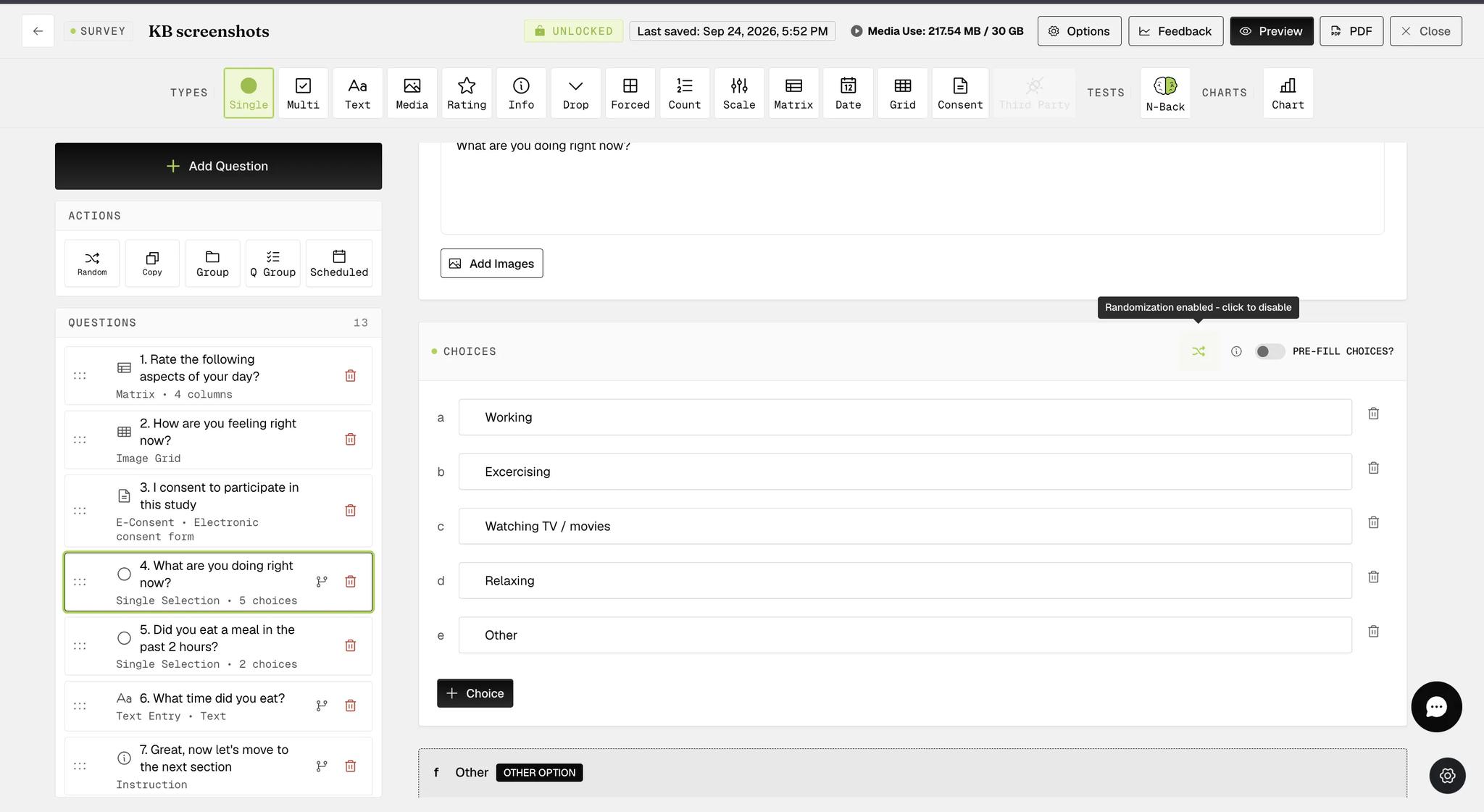
Response choices for Single Selection and Multiple Selection question types, including those within Groups or Question Groups, can be easily randomized with a single click, as indicated below.

Screenshot — How to randomize response choices

When the randomization option is configured, the button appears green (as shown in the screenshot below).

Screenshot — Randomize response choices for single selection question

The randomized response choices functionality is available within Question Groups at the individual question level, providing more flexibility in survey creation. In the example below, the multiple-selection question within the Question Group with this functionality configured will display a list of randomized response choices, with the 'other' and 'none of the above' options appearing at the bottom on participants' mobile devices.

Screenshot — Randomize response choices for question group

On the mobile end, participants will see that the response choices are randomized each time they take the same survey.

Example screenshots for a single selection question

Screenshot — Mobile screenshot - randomized choices
Screenshot — Mobile screenshot - question with randomized choices

Example screenshots for a multiple selection question within Question Group

Screenshot — Mobile screenshot - multiple selection question with randomized choices
Screenshot — Mobile screenshot - example question with randomized choices
Video demo — Randomize Response Choices (coming soon)
Was this helpful?
Start today

تحدّث إلى إنسان من فريق ExpiWell.

ما زلت عالقاً؟ فريقنا من الباحثين يجيب عن الأسئلة التقنية وأسئلة تصميم الدراسات على السواء.