建设中

你的这次采样正好赶上我们施工。

这些指南面向新版 ExpiWell 平台(v2),仍在撰写、校对和调整中——请谅解眼前的脚手架:页面可能在两次访问之间移动或更改。仍在使用旧版应用?其文档仍保留在旧的支持门户上。

打开旧版支持门户
知识库  /  来自 ExpiWell 团队

我们能你什么?

覆盖研究每一步的指南——从第一个项目到最终的数据导出。ExpiWell 知识库,服务于研究者网页平台与参与者移动应用。

28 个类别下共 97 篇指南 · 由 ExpiWell 团队维护更新
Help CenterBuildSurvey Creation

Randomize response choices

Build · Survey Creation
Updated 2025年1月3日

Why Randomizing Response Choices Can Improve Participant Answers

In experience sampling and ecological momentary assessments, randomizing response choices can help reduce response sets. Participants who receive response choices in the same order tend to respond consistently over time, often without much thought. By randomizing these choices, we change the survey's presentation, which can help alleviate this issue.

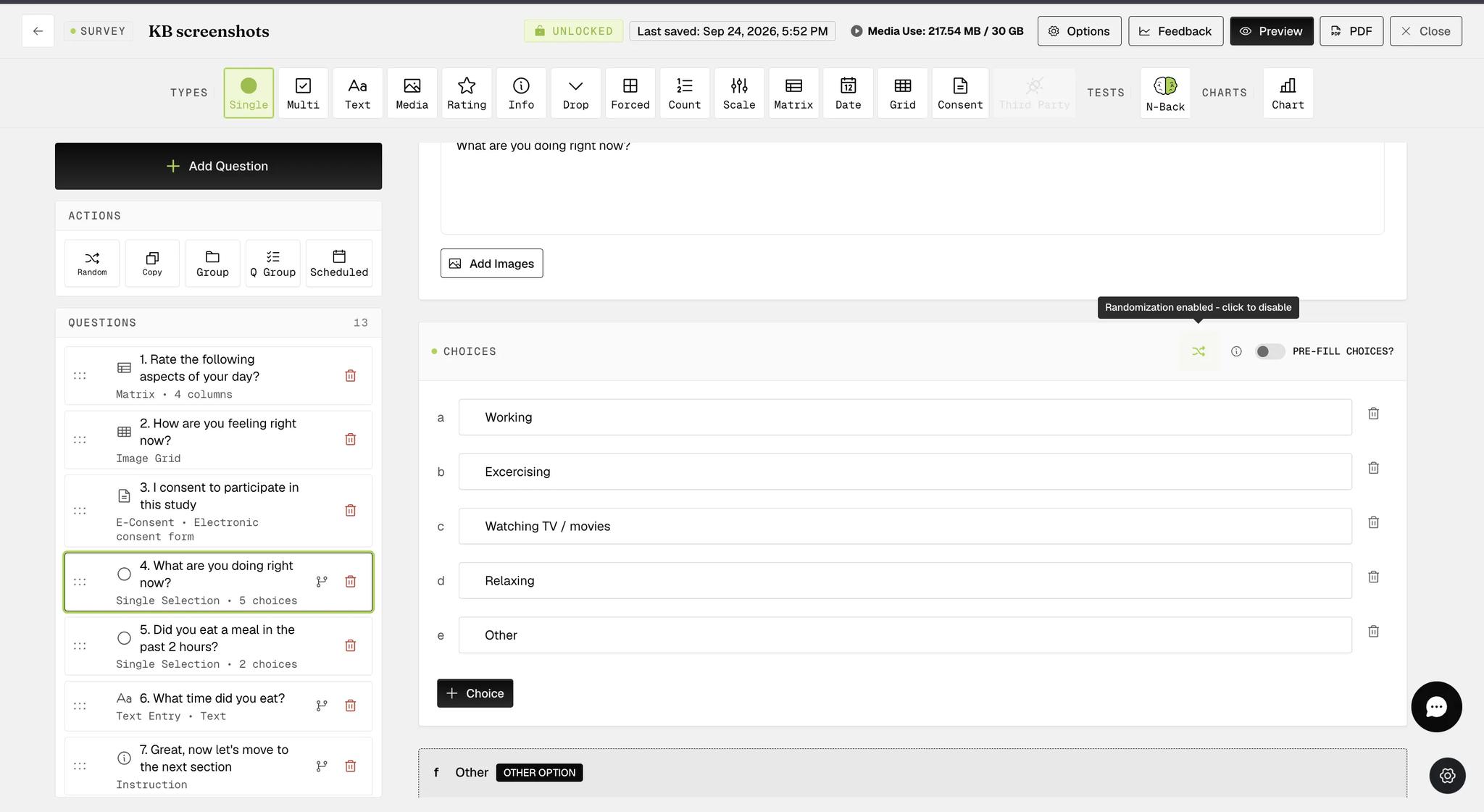
Response choices for Single Selection and Multiple Selection question types, including those within Groups or Question Groups, can be easily randomized with a single click, as indicated below.

Screenshot — How to randomize response choices

When the randomization option is configured, the button appears green (as shown in the screenshot below).

Screenshot — Randomize response choices for single selection question

The randomized response choices functionality is available within Question Groups at the individual question level, providing more flexibility in survey creation. In the example below, the multiple-selection question within the Question Group with this functionality configured will display a list of randomized response choices, with the 'other' and 'none of the above' options appearing at the bottom on participants' mobile devices.

Screenshot — Randomize response choices for question group

On the mobile end, participants will see that the response choices are randomized each time they take the same survey.

Example screenshots for a single selection question

Screenshot — Mobile screenshot - randomized choices
Screenshot — Mobile screenshot - question with randomized choices

Example screenshots for a multiple selection question within Question Group

Screenshot — Mobile screenshot - multiple selection question with randomized choices
Screenshot — Mobile screenshot - example question with randomized choices
Video demo — Randomize Response Choices (coming soon)
Was this helpful?
Start today

与 ExpiWell 团队的真人交流。

还没解决?我们的研究者团队既解答技术问题,也解答研究设计问题。