Im Aufbau

Ihre Stichprobe hat uns mitten im Umbau erwischt.

Diese Anleitungen beschreiben die neue ExpiWell-Plattform (v2) und werden noch geschrieben, geprüft und umgebaut — entschuldigen Sie das Gerüst: Seiten können sich zwischen Besuchen verschieben oder ändern. Noch in der bisherigen App? Deren Dokumentation bleibt im alten Support-Portal.

Zum bisherigen Support-Portal
Wissensdatenbank  /  Vom ExpiWell-Team

Wie können wir helfen?

Anleitungen für jeden Schritt Ihrer Studie — vom ersten Projekt bis zum finalen Datenexport. Die ExpiWell-Wissensdatenbank für die Forschungsplattform im Web und die mobile Teilnehmer-App.

97 Anleitungen in 28 Kategorien · Gepflegt vom ExpiWell-Team
Help CenterBuildSurvey Creation

Randomize response choices

Build · Survey Creation
Updated 3. Januar 2025

Why Randomizing Response Choices Can Improve Participant Answers

In experience sampling and ecological momentary assessments, randomizing response choices can help reduce response sets. Participants who receive response choices in the same order tend to respond consistently over time, often without much thought. By randomizing these choices, we change the survey's presentation, which can help alleviate this issue.

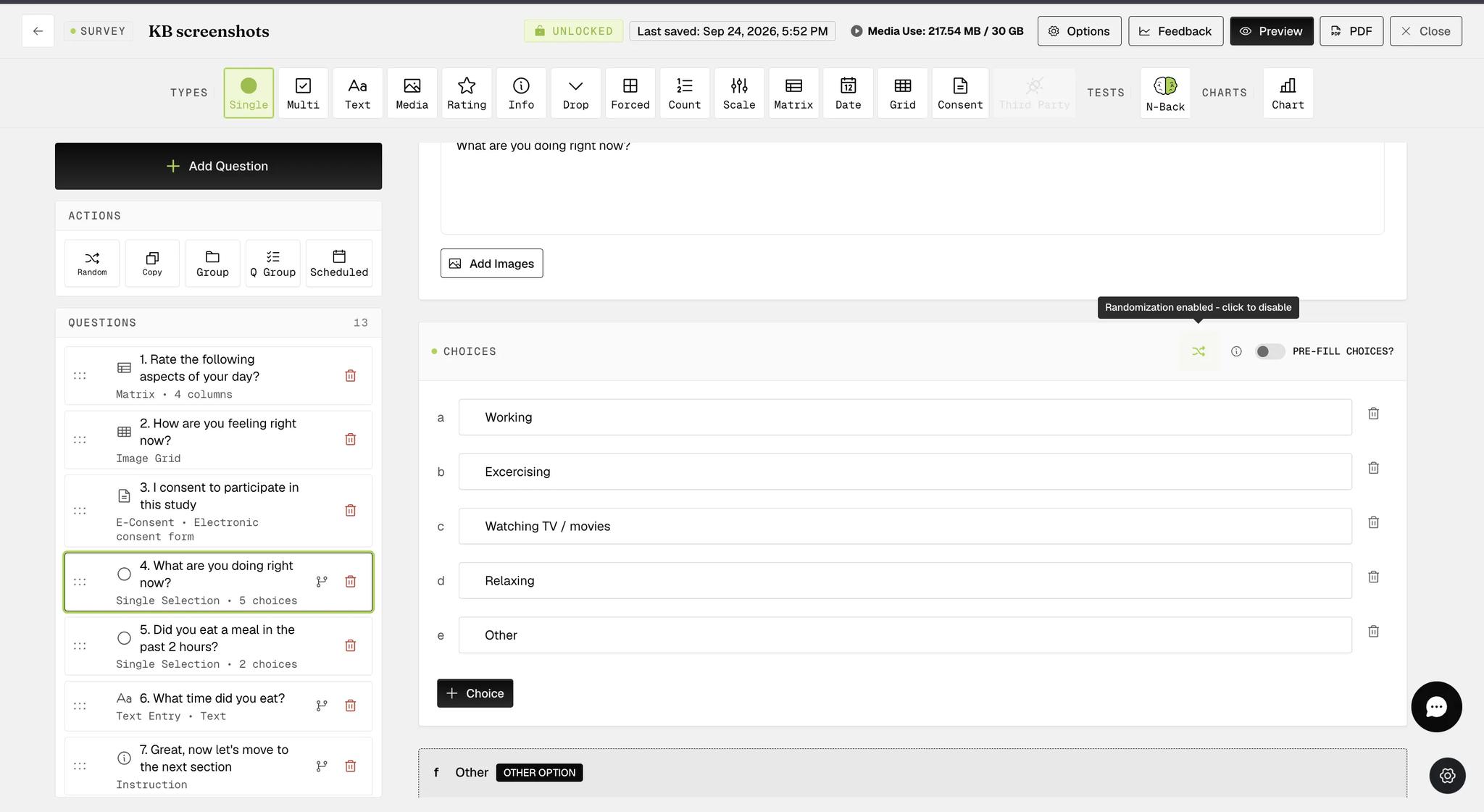
Response choices for Single Selection and Multiple Selection question types, including those within Groups or Question Groups, can be easily randomized with a single click, as indicated below.

Screenshot — How to randomize response choices

When the randomization option is configured, the button appears green (as shown in the screenshot below).

Screenshot — Randomize response choices for single selection question

The randomized response choices functionality is available within Question Groups at the individual question level, providing more flexibility in survey creation. In the example below, the multiple-selection question within the Question Group with this functionality configured will display a list of randomized response choices, with the 'other' and 'none of the above' options appearing at the bottom on participants' mobile devices.

Screenshot — Randomize response choices for question group

On the mobile end, participants will see that the response choices are randomized each time they take the same survey.

Example screenshots for a single selection question

Screenshot — Mobile screenshot - randomized choices
Screenshot — Mobile screenshot - question with randomized choices

Example screenshots for a multiple selection question within Question Group

Screenshot — Mobile screenshot - multiple selection question with randomized choices
Screenshot — Mobile screenshot - example question with randomized choices
Video demo — Randomize Response Choices (coming soon)
Was this helpful?
Start today

Sprechen Sie mit einem Menschen aus dem ExpiWell-Team.

Kommen Sie nicht weiter? Unser Team aus Forschenden beantwortet technische Fragen ebenso wie Fragen zum Studiendesign.