Developer Hub: Read your study data over an API
What the Developer Hub is
The Developer Hub is ExpiWell's programmable interface. It is how you connect your study to the systems your team already runs, so that studies, participants, responses and media become something your own code can reach, on your schedule, in whatever shape your stack expects.
That turns ExpiWell from somewhere data is collected into part of your infrastructure. A nightly pull into the lab's analysis pipeline. A dashboard in your own BI tool that refreshes itself. A warehouse that always holds the current picture. A reproducibility script that fetches exactly the rows a paper was written from. And, once those endpoints ship, media and transcripts flowing into the tooling you already use to process them.
You create a credential in Settings, your application exchanges it for a short-lived access token, and from there it talks to a standard HTTP API. The whole surface is documented with OpenAPI, so most clients can generate themselves from it.
Watch the walkthrough
The whole path end to end: asking for access, creating a credential, and making the first request.
Version 1 covers data access, and it is the foundation for what follows. The interface is versioned and published so that the surface can grow without breaking anything you have already built against it.
How a request actually works
Two tiers, and the split is the point.
- A credential. Long-lived, created by you in Settings. It is the thing you store in your script's secret manager, and it never travels except to one endpoint.
- An access token. Short-lived, 10 to 60 minutes, obtained by presenting the credential. Every data request carries the token, not the credential.
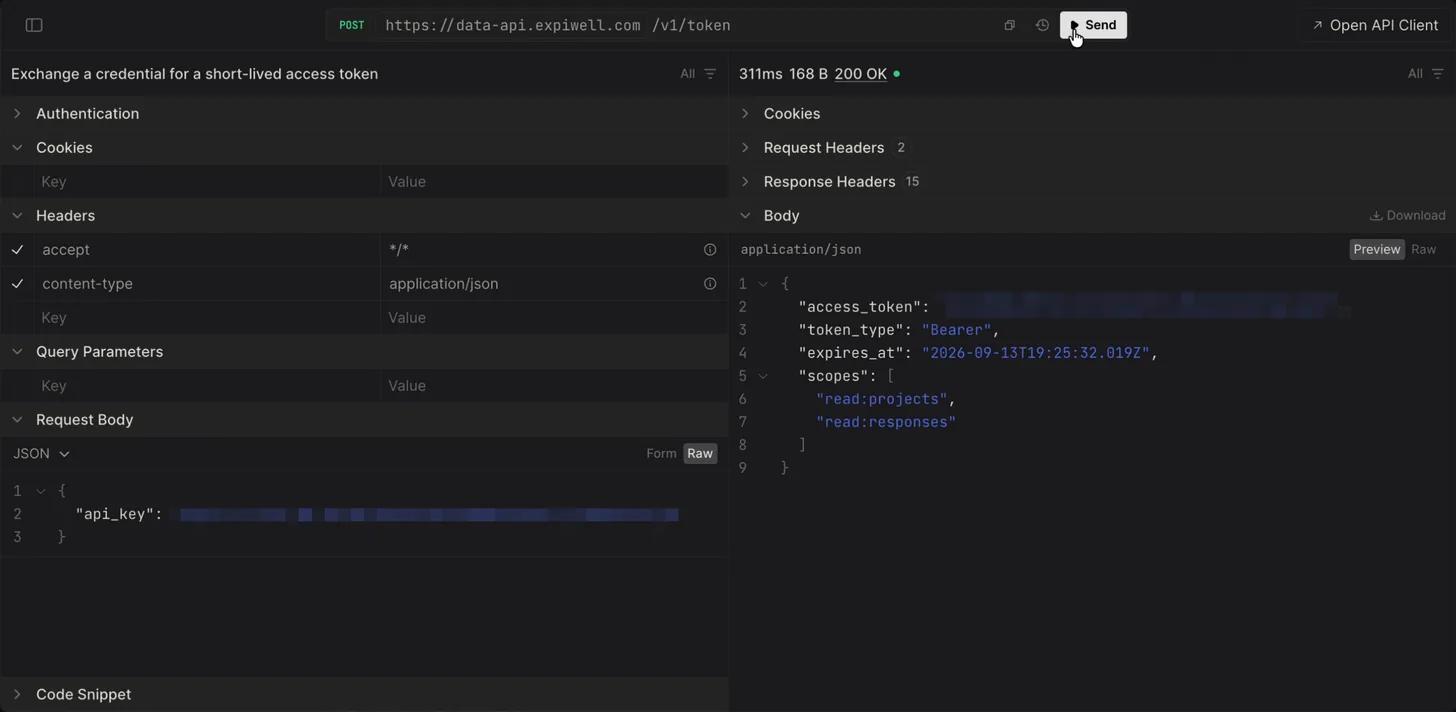
The reason for the indirection is blast radius. Credentials end up in places nobody intended: a shell history, a CI log, a screenshot in a support ticket. A token found in one of those places expires on its own within the hour, and it only works from the addresses you allowed.
What a credential can reach
Four permissions, chosen when you create it. Pick the least you need.
| Permission | What it covers |
|---|---|
| Studies | Your projects and their status |
| Participants (IDs only) | The anonymous identifiers in a project. No names, no emails, no contact details |
| Responses | Survey responses and the answers within them |
| Media & transcripts | Audio, images and transcriptions attached to responses. Grantable today; the endpoints follow in a later release |
The interactive reference shows exactly which calls each permission unlocks and what every field contains.
Participants are deliberately IDs only. The API returns the same anonymous identifier your exports use, so responses can be linked to a participant across surveys, but the identity behind that identifier is never served. That is the minimum-necessary principle applied in code, not just in policy.
The guarantees you can build on
- Scoped to your account. A credential reaches your studies and no one else's. A request for a project belonging to another researcher returns exactly what a project that never existed returns, so the API cannot be used to discover what other accounts hold.
- Locked to the addresses you name. Every credential carries an address allowlist, checked on every single request rather than once at creation.
- Revocation is immediate. Revoke a credential and every token already issued from it stops on the next request, rather than at the end of the token's hour. The same applies if the role of whoever created it changes.
Try the API before you write anything
The interactive reference is public. It describes what a credential could reach, never any study data, so you can read the whole surface before you ask for access:
- Interactive reference: data-api.expiwell.com/docs
- OpenAPI document: data-api.expiwell.com/v1/schema
Point your client generator at the schema and most of the integration writes itself. See Where your data lives for how the region your account belongs to decides which endpoint you use.
Before you can use it
The Developer Hub is enabled per account by an ExpiWell administrator. If you do not see it in Settings, it has not been switched on for your account yet. See Requesting Developer Hub access.
Once it is on, create a credential and then make your first request.
Where your data lives
Requests are served from the region your account belongs to. US accounts are served from the United States. The EU endpoint is provided once that region is enabled for your account; EU study data is served from within the EU and does not leave it.
Use the base URL for your own region, because a credential issued in one region does not work in the other. Your Developer Hub settings page links the correct reference for your account, so following it from there is always right.