Add funds for participant payments
Set up · Organization & Team
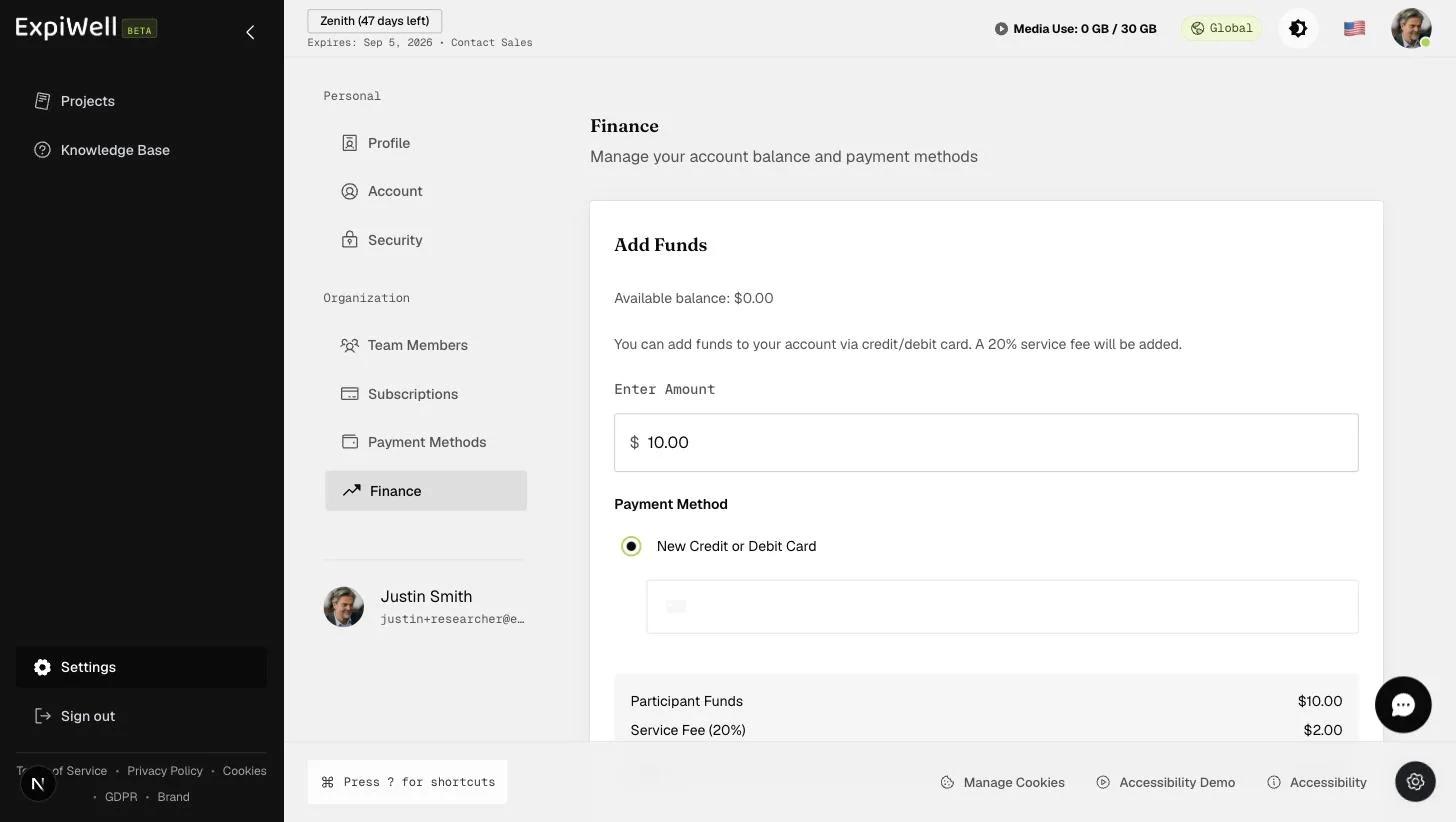
Updated 15. Oktober 2026Participant compensation is paid from your account balance, which you top up at Settings → Finance (under Organization).
Step by step
- Open Settings → Finance. Your available balance is shown at the top of the Add Funds card.
- Enter the amount to add.
- Choose a payment method — a new credit or debit card, or a saved card.
- Check the breakdown. A 20% service fee is added on top of the amount: add $10.00 and your card is charged $12.00, while your balance receives the $10.00.
- Click Preview Payment, then review the Confirm Payment dialog and confirm.
- Verify it's you — ExpiWell emails a six-digit code. Enter it and click Verify and charge. Nothing is charged until you do.
- Your balance updates, and ExpiWell emails a receipt with a link to the full invoice.
How the balance is used
Funds pay participants through the app: their earnings collect under My Balance, and from $5.00 they redeem them as an Amazon gift card whose claim code is emailed to them. See the Paying Participants guides for the full process:
- Overview of the payment arrangement process
- Paying participants for survey participation
- Funding your payment account
Watch it in action
Was this helpful?