Survey pause when adding a new survey window
Event triggers can stack surveys on a participant: a triggered survey arrives while the day's scheduled ones are still open, and they end up answering three where you meant them to answer one.
Pause overlapping surveys is the setting that prevents it. With it on, any scheduled survey whose window overlaps the event-triggered one is suppressed.
The guide and the interface use different words for this. It is often called "survey pause", but the control itself reads Pause overlapping surveys, on an Adjust Schedule task.
Example 1: A window with fixed times
-
You may have already scheduled two daily surveys that occur every day:
- Daily Survey 1 (9-11am); Daily Survey 2 (1-3pm)
-
You create an Event-Triggered Survey window scheduled from 10am to 2pm.
-
Left off, the participant takes three surveys that day: Daily Survey 1, Daily Survey 2 and the triggered one.
-
Switched on, they take only the triggered survey — its window overlaps both of the others, so both are suppressed.
Example 2: A window relative to the event
-
You may have already scheduled two daily surveys that occur every day:
- Daily Survey 1 (9-11am); Daily Survey 2 (1-3pm)
-
You create an Event-Triggered Survey window that opens 1 minute to 200 minutes after the event.
-
Left off, the participant again takes all three.
-
Switched on, any daily survey the triggered window touches is suppressed — one of them or both, depending on where the window lands.
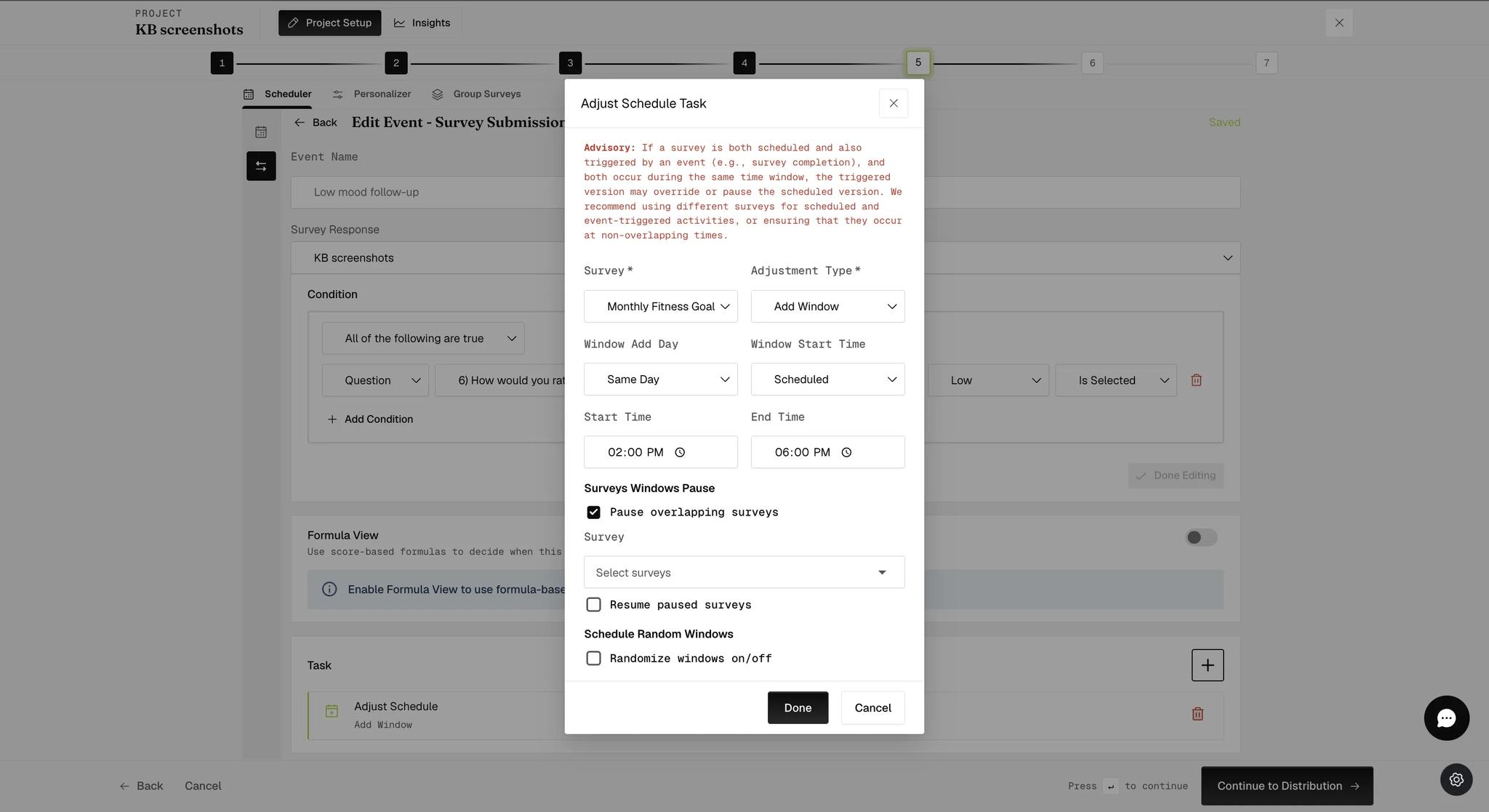
You will find it under Surveys Windows Pause, below the window's timing. Switching it on reveals two more controls:
- Select surveys — which surveys this pause applies to. It does not have to be everything that overlaps.
- Resume paused surveys — "automatically resume any previously paused ongoing, multiple-submission surveys once the triggered survey window closes". So a paused survey can come back rather than being lost for good, provided it is one that accepts multiple submissions.
Resuming only applies to ongoing, multiple-submission surveys. A one-time survey that was paused is not re-offered when the window closes.
Without Resume paused surveys, a suppressed survey is not collected at all — not moved to a later slot, not asked afterwards. If you need the data from both, either switch resuming on where the survey allows it, or keep the windows from overlapping in the first place.