En construcción

Nos has muestreado a medio construir.

Estas guías cubren la nueva plataforma ExpiWell (v2) y todavía se están escribiendo, revisando y reorganizando — disculpa el andamiaje: las páginas pueden moverse o cambiar entre visitas. ¿Sigues en la app anterior? Su documentación permanece en el portal de soporte antiguo.

Ir al portal de soporte anterior
Base de conocimiento  /  Del equipo de ExpiWell

¿En qué podemos ayudarle?

Guías para cada paso de su estudio: de su primer proyecto a la exportación final de datos. La base de conocimiento de ExpiWell para la plataforma web del investigador y la app móvil del participante.

97 guías en 28 categorías · Actualizadas por el equipo de ExpiWell
Help CenterBuildSurvey Creation

Randomize response choices

Build · Survey Creation
Updated 3 de enero de 2025

Why Randomizing Response Choices Can Improve Participant Answers

In experience sampling and ecological momentary assessments, randomizing response choices can help reduce response sets. Participants who receive response choices in the same order tend to respond consistently over time, often without much thought. By randomizing these choices, we change the survey's presentation, which can help alleviate this issue.

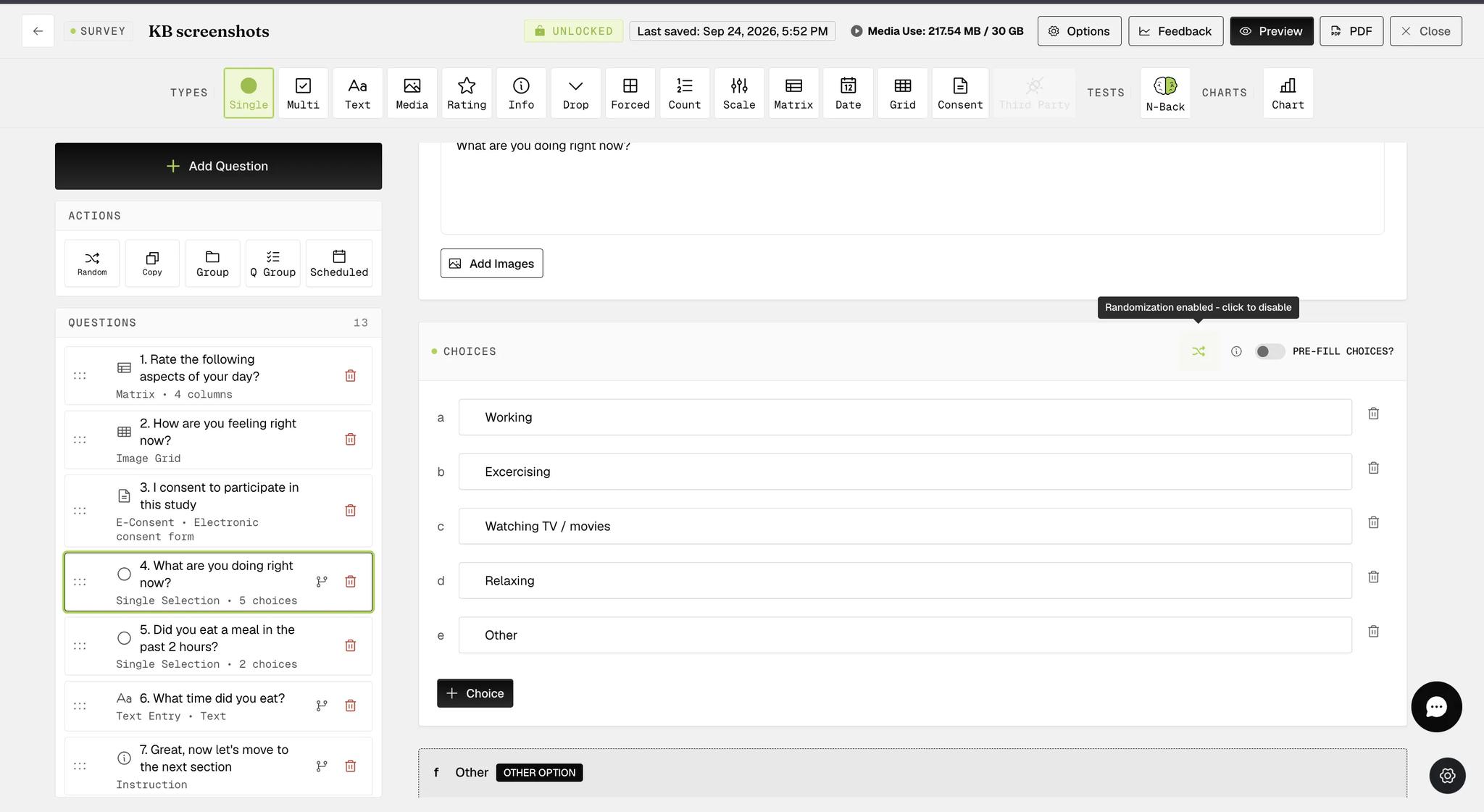
Response choices for Single Selection and Multiple Selection question types, including those within Groups or Question Groups, can be easily randomized with a single click, as indicated below.

Screenshot — How to randomize response choices

When the randomization option is configured, the button appears green (as shown in the screenshot below).

Screenshot — Randomize response choices for single selection question

The randomized response choices functionality is available within Question Groups at the individual question level, providing more flexibility in survey creation. In the example below, the multiple-selection question within the Question Group with this functionality configured will display a list of randomized response choices, with the 'other' and 'none of the above' options appearing at the bottom on participants' mobile devices.

Screenshot — Randomize response choices for question group

On the mobile end, participants will see that the response choices are randomized each time they take the same survey.

Example screenshots for a single selection question

Screenshot — Mobile screenshot - randomized choices
Screenshot — Mobile screenshot - question with randomized choices

Example screenshots for a multiple selection question within Question Group

Screenshot — Mobile screenshot - multiple selection question with randomized choices
Screenshot — Mobile screenshot - example question with randomized choices
Video demo — Randomize Response Choices (coming soon)
Was this helpful?
Start today

Hable con una persona del equipo de ExpiWell.

¿Sigue atascado? Nuestro equipo de investigadores responde tanto dudas técnicas como de diseño del estudio.